The clinic runs at the speed of the front desk. So does this.
Flowscale takes a patient from the queue to a printed prescription to a
GST invoice without anyone retyping a name. Queue, consult, pharmacy and
billing are one flow — and the consult screen is built to be faster than
the pad it replaces.
Every screenshot below is the running product, photographed against the
demo clinic — not a mockup.
~7sof input for a full prescription
6independently deployable services
500backend tests on every change
0API tokens held in the browser
One flow, three counters
A morning at a polyclinic, end to end
The same visit moves through three people. Nothing is re-entered, and
nobody waits on another counter to finish.
01
The desk takes them in
Register or find the patient, book them onto a doctor, hand over a
token. Patient codes and token numbers are row-locked counters, so two
busy counters can never mint the same number.
Receptionist · phone or tablet
02
The doctor sees them
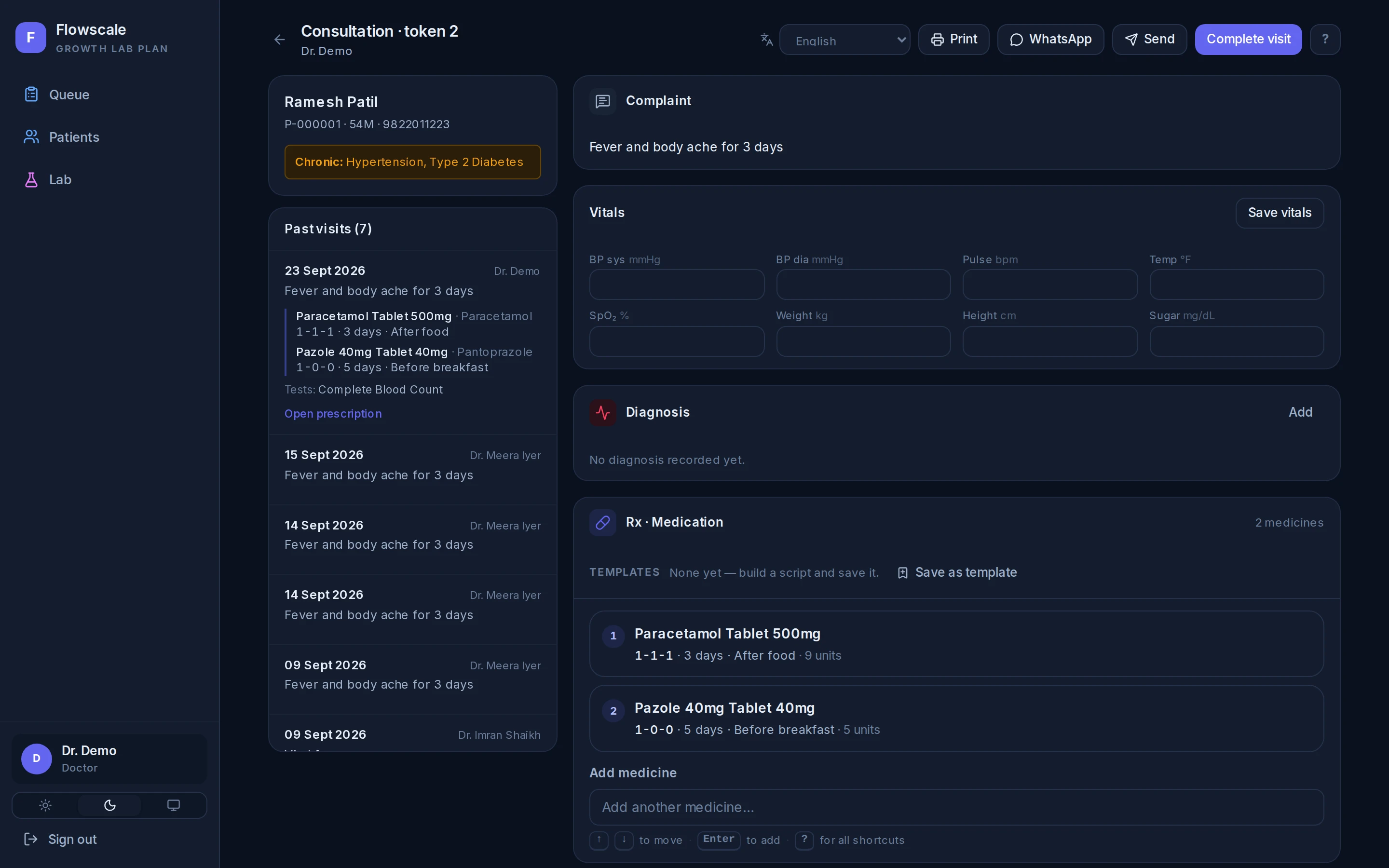
Allergies and chronic conditions sit in an always-visible panel.
Medicines are typed, arrowed and entered — never hunted for. Dosage,
duration and instructions are chosen, and quantity derives itself.
Doctor · keyboard only
03
The counter dispenses and bills
The prescription arrives at the pharmacy with batches picked
first-expiry-first. Stock is reserved before the invoice is written,
so the last pack can only be sold once.
Pharmacist · GST invoice out
The product, photographed
Every screen here is the running app
Captured by a script that signs in as the role that actually uses the
screen and photographs what they see. Switch the theme in the header and
these switch with it — dark mode is the product's, not this page's.
/consult/…
The consult screen
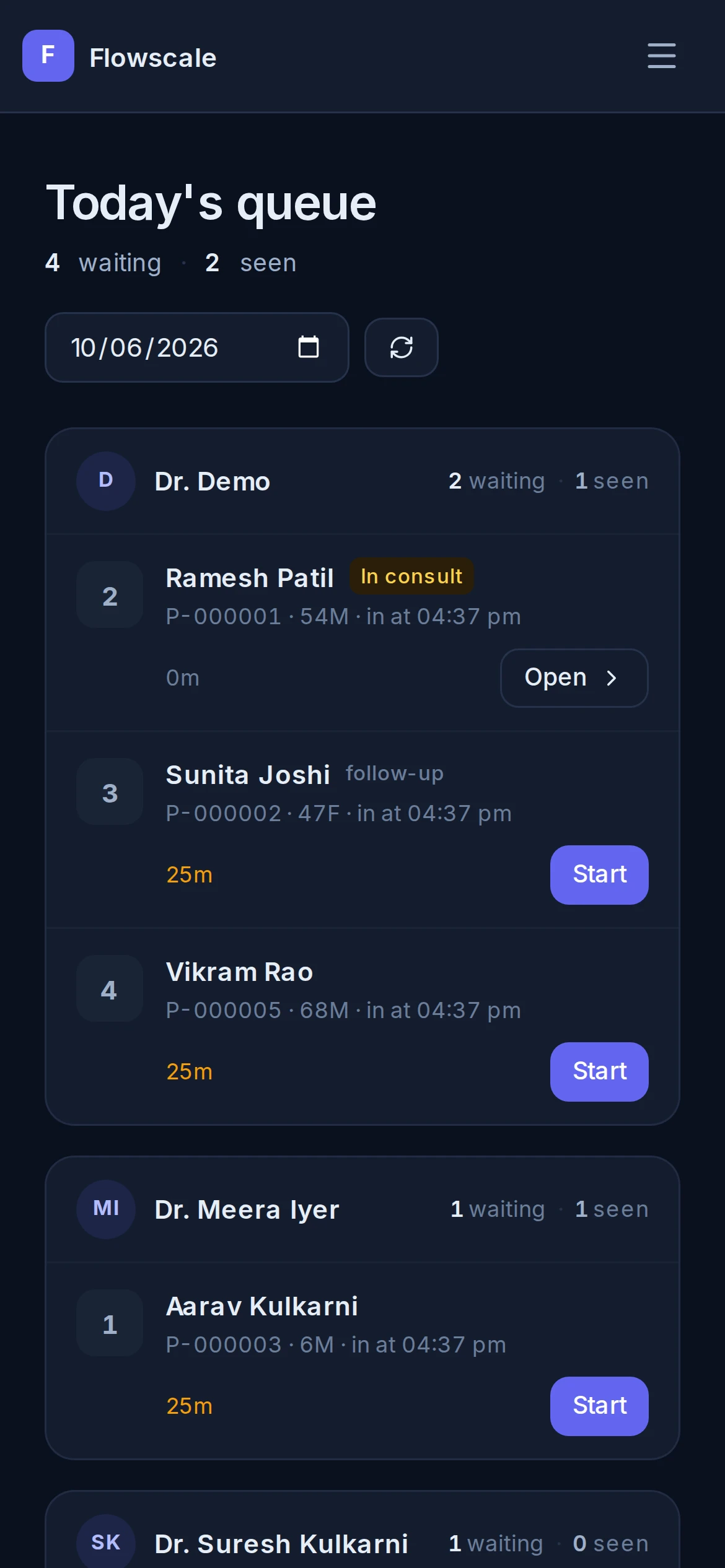
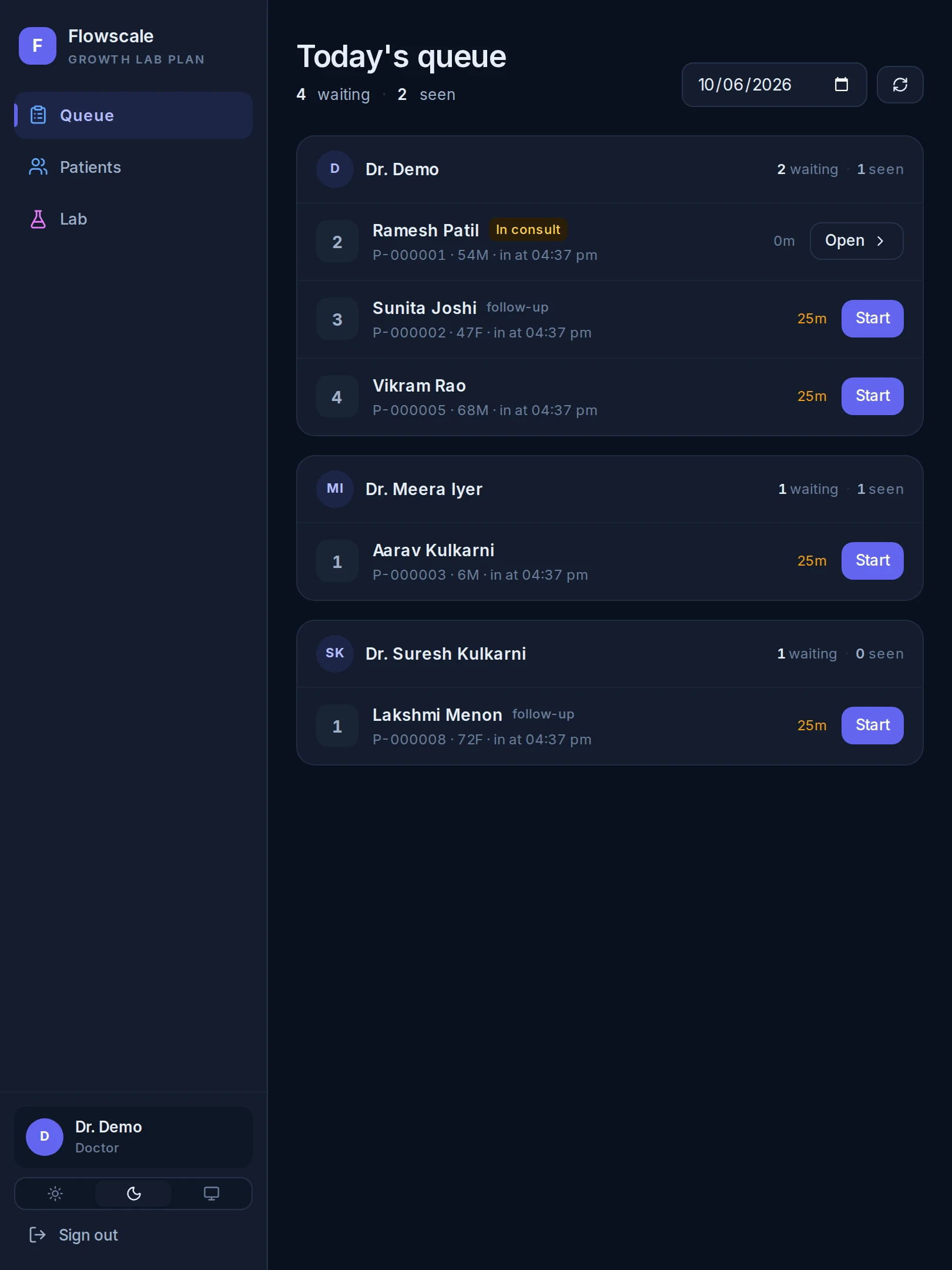
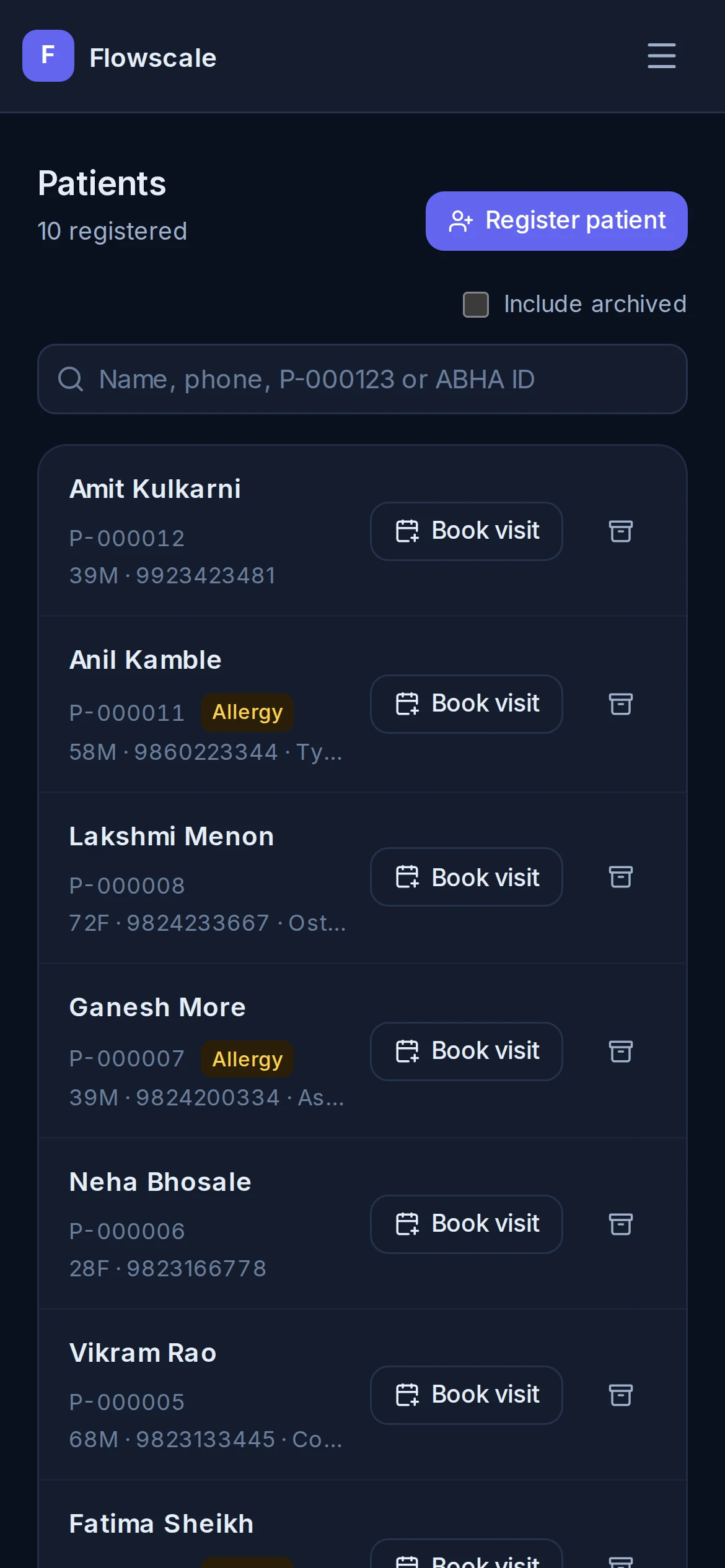
Reception is a handheld job
The front desk works standing up
Not a shrunk-down desktop as an afterthought — the intake path is
driven at phone and tablet sizes on every change, finger targets are
44px, and the whole navigation is reachable with a thumb. A
receptionist standing at the counter is the primary user, not the
edge case.
Register, book and check the queue without sitting down
Every screen the sidebar offers is in the phone menu too
The same list, laid out for whichever device is on the counter
Tablet at the desk
Phone in hand
What the patient walks out with
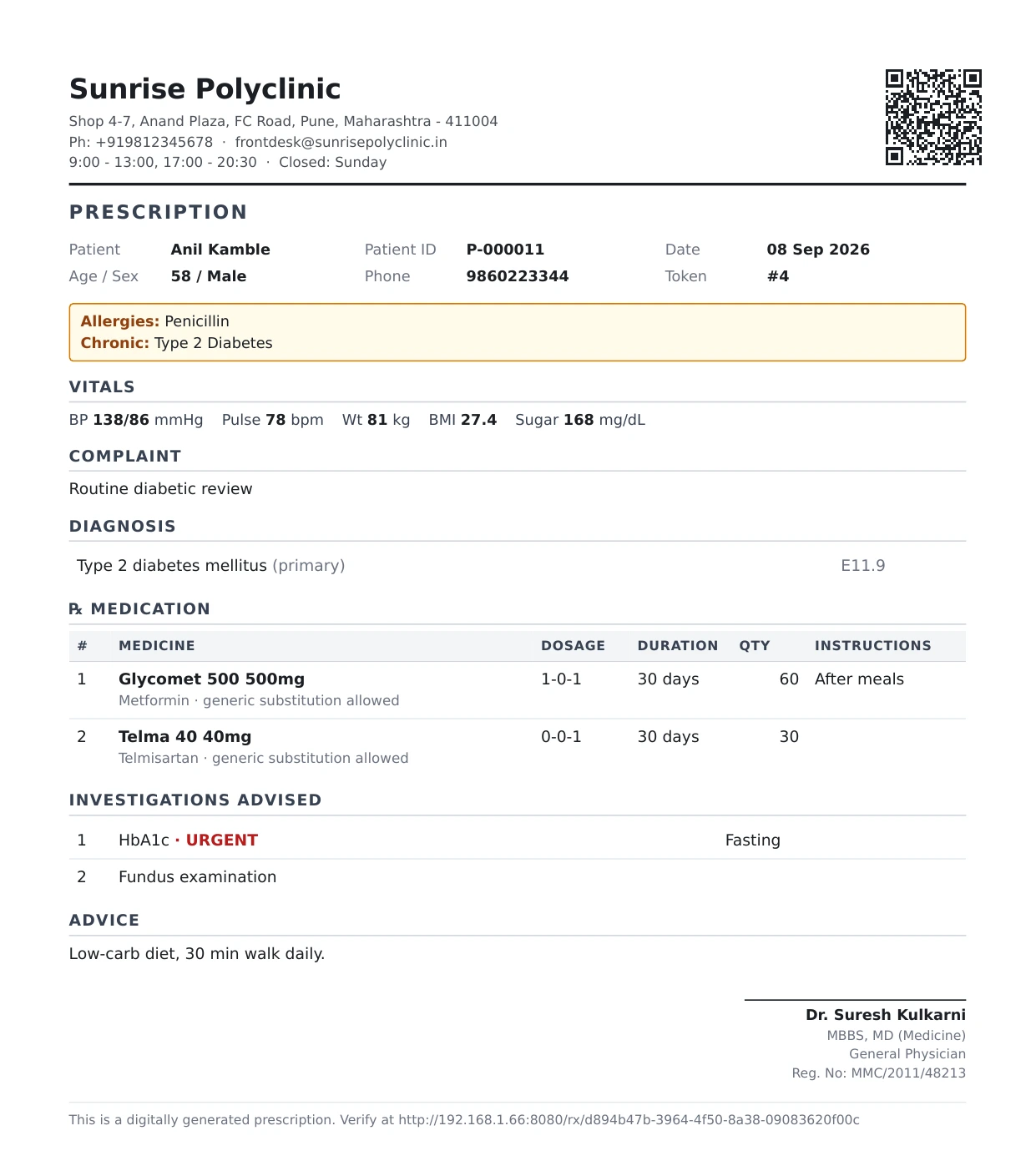
The prescription is the product
Everything else is how it gets written. This is the thing the patient
carries to the counter, shows a specialist six months later, and hands
to a pharmacist who has never heard of your clinic — so it is the part
that has to be right on paper, not just on screen.
The prescriber's registration number, every time. It is a
statutory requirement, so the document refuses to render without it
rather than printing a script that is not valid.
Allergies and chronic conditions above the medicines, where the
pharmacist reads them before counting anything out.
The generic beside every brand, so a substitution at the
counter is a decision rather than a guess.
A QR code that verifies it came from this clinic — and prints
on the clinic's own letterhead if they have one.
Printed exactly as prescribed and kept that way: the drug names and
doses are written onto the document, not looked up again later. Reprint
it next year and it still says what the doctor said.
Rendered by the product, not redrawn for this page.
Why it holds up on a bad day
The decisions you only notice when something breaks
A clinic does not get to stop because one part of the software is having
a moment. These are the choices that keep the desk working anyway.
A prescription in seconds, not minutes
Type, arrow, enter. The medicine ranking is typo-tolerant and weighted
by what this doctor actually prescribes, and the screen shows why
something ranked rather than quietly re-sorting it. Free text always
works, so a drug missing from the catalogue never blocks a script.
The last pack can only be sold once
Stock is reserved before an invoice is written, then committed — never
unwound after the fact, because compensating cannot un-hand a medicine
to a patient. Two counters billing the same batch at the same moment
get one yes and one no.
An invoice reproduces itself, years later
Prices and drug names are written onto the document as charged, not
looked up again at print time. Rename a medicine or reprice the
catalogue and last April's invoice still prints exactly what the
patient paid for.
It degrades out loud, or not at all
Anything touching money or stock refuses rather than guesses. Anything
else keeps working from its own records and says what it could
not reach. The queue board and patient history stay up even when the
service that issues logins is down.
Reception works standing up
The intake path — register, book, queue — is exercised at phone and
tablet sizes on every change, because that is where the front desk
actually does it. A screen that renders but cannot be navigated with a
thumb counts as broken.
The browser never holds a credential
The session lives in an httpOnly cookie and every call is attached
server-side. A cross-site scripting bug in software holding patient
records should not be able to walk off with working credentials — so
there are none in the page to take.
Dates are right in IST, including at 11pm
Every date the clinic sees — queue day, token series, expiry, the
April–March financial year an invoice is numbered in — is computed in
Indian time. A server thinking in UTC would file an 8pm invoice under
yesterday, and a test in the shared library keeps it honest.
An audit trail that cannot fail the work
Services announce what happened; a separate service writes the record.
That ordering is the guarantee: logging a consultation can never be the
reason the consultation failed to save.
Pricing
Priced by how complex the clinic is, not how many seats
A clinic grows from OPD-only, to OPD plus a pharmacy counter, to a small
hospital with beds. The tiers follow that, and moving up is a plan
change rather than a migration — your operator switches the plan and the
modules follow at the clinic's next sign-in.
Available today
Starter
Solo or small clinic · 1–3 doctors
₹500/month
or ₹5,000 a year — two months free
Patients, appointments and the OPD queue
Consultation and prescriptions
Printable prescription
Shipping
Most polyclinics
Growth
Multi-doctor polyclinic · 4–10 doctors + pharmacy
₹1,500/month
or ₹12,000 a year — save ₹6,000
Everything in Starter
GST billing and invoicing
Pharmacy: batches, expiry, counter sales
WhatsApp and SMS delivery
Shipping
Growth + Lab
Growth clinic with a pathology bench of its own
₹2,500/month
or ₹20,000 a year — save ₹10,000
Everything in Growth
A worklist of the samples the clinic owes, urgent first
Book the collection slot and message the patient — fasting note and all
File a whole panel: a CBC is one sample and a dozen values
Every value trends on its own, across years of visits
Shipping
Every price here includes GST. What the clinic sees is what the
clinic pays — no eighteen per cent appearing on the invoice that was not
on the page.
Planned modules
Growth + Diagnostics
Lab and imaging — X-ray, USG, ECG
Priced at launch
Everything in Growth + Lab
Scan scheduling
Imaging report delivery
On the roadmap
Hospital
Clinic converted to a small hospital with beds
Priced at launch
Everything in Growth
Wards, beds and case sheets
Discharge summaries, consolidated IPD billing
On the roadmap
What each plan actually includes
Every line here is something the software does today. Imaging and
in-patient care are on the roadmap below and are not in this table,
because a feature nobody can use yet does not belong in a price
comparison.
Features included in the Starter, Growth and Growth plus Lab plans
Featureall prices incl. GST
Starter₹500/mo
Growth₹1,500/mo
Growth + Lab₹2,500/mo
Every planThe clinic's day, from the front desk to the printed script.
Patient recordsEvery patient's history, allergies and chronic conditions on one screen — not in a register only one person can hold.
✓
✓
✓
The OPD queueToday's list per doctor: who is waiting, who is in consult, and how long they have been there.
✓
✓
✓
Appointments and walk-insBooked slots and walk-ins on the same board, because a real morning is both.
✓
✓
✓
Consultation and diagnosisVitals, complaint, examination and diagnosis recorded as the doctor works, not typed up afterwards.
✓
✓
✓
PrescriptionsPrinted on the clinic's own letterhead, including pre-printed stationery, in the patient's own language.
✓
✓
✓
Prescription verification NewA QR on every script. A pharmacist scans it and sees the clinic, the prescriber and their registration number — and nothing whatsoever about the patient.
✓
✓
✓
Roles that actually restrictA receptionist cannot open clinical notes; a pharmacist cannot write a script. Enforced at the server, not hidden in a menu.
✓
✓
✓
Activity trailWho opened which record, and when — the question that matters after a complaint.
✓
✓
✓
Clinic analyticsFootfall, consultation mix and follow-up rates, by doctor and by day.
✓
✓
✓
The pharmacy counterFrom Growth. The counter the clinic already runs, on the same system as the consult.
Stock by batch and expiryEach batch tracked on its own, so the strip that expires first is the strip that goes out first.
–
✓
✓
Dispensing against a scriptThe counter sees what was prescribed, so nothing is retyped and nothing is guessed.
–
✓
✓
Counter salesOver-the-counter sales without a visit, drawn from the same stock.
–
✓
✓
Expiry and low-stock warningsTold while it is still stock, rather than after it is a write-off.
–
✓
✓
BillingFrom Growth.
GST invoicingInvoices with the right tax treatment, numbered in a sequence that does not skip.
–
✓
✓
Revenue and collectionsWhat the clinic actually took, by doctor and by day.
–
✓
✓
Talking to patientsFrom Growth.
WhatsApp and SMSAppointment reminders, and a message when a report is ready.
–
✓
✓
Documents as a linkThe prescription or the invoice as a link the patient can open, rather than an attachment that fails.
–
✓
✓
The pathology benchGrowth + Lab. For a clinic that runs its own samples.
Sample worklistWhat the bench owes, urgent first, grouped by patient rather than scattered across tests.
–
–
✓
Collection slotsTell the patient when to come and what to avoid — the fasting note comes off the clinic's own price list.
–
–
✓
A whole panel at once NewA CBC is one sample and a dozen values. File them together instead of one request at a time.
–
–
✓
Every value trends on its ownHaemoglobin across years of visits, rather than buried inside a report called “CBC”.
–
–
✓
The clinic's own price listTests, packages and the prices the clinic sets, charged at the counter as the sample is booked.
–
–
✓
Per clinic, not per seat — add as many doctors and counter staff as the
clinic actually has. Starter, Growth and Growth + Lab are what the product
does today; Imaging and in-patient care are planned modules and are marked
as such rather than sold as shipped, so they get a price when they ship and
not before.
Get started
See it on your own clinic's day
No sign-up form and no trial account to poke at alone. We walk you
through it on a call — the queue, a real consultation, the pharmacy
counter and a GST invoice — against a clinic set up the way yours runs.
Half an hour on Google Meet, and you will know whether the consult
screen is faster than what your doctors use now.